
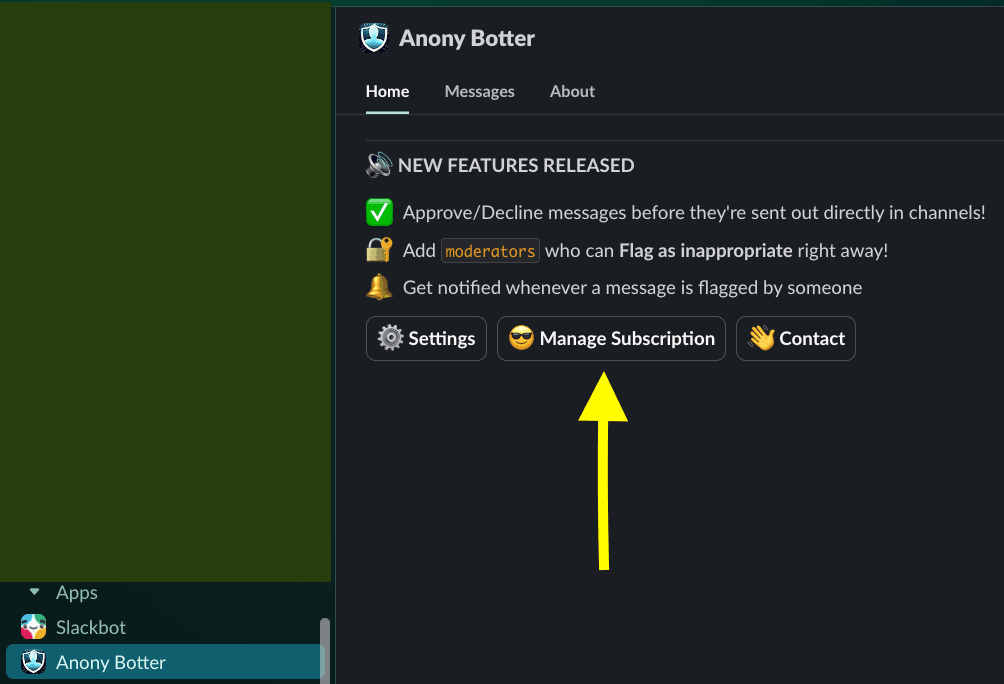
1. Open the Anony Botter App Home in Slack.
Inside your Slack workspace, find Anony Botter in the sidebar under Apps. If you don't see it, search for Anony Botter from the top search bar. Clicking the app name opens its Home tab — that's where billing lives.
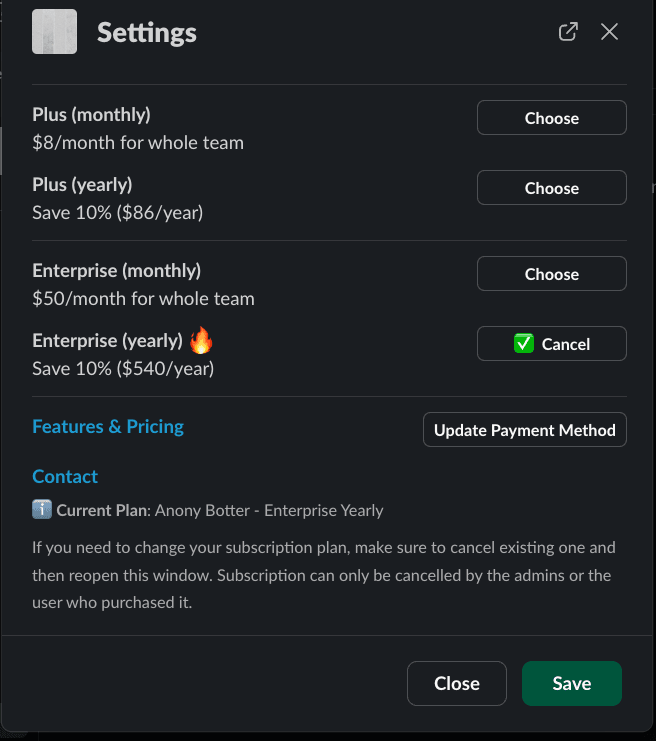
2. Pick your plan.
A subscription panel opens with all three tiers — Free, Plus, and Enterprise. Click Choose next to the plan you want. Every tier is billed per Slack workspace, not per user — so a 5-person team and a 500-person team pay the same on the same tier.
3. Check out with Paddle.
Paddle is our merchant of record. You'll see a secure checkout that accepts all major credit and debit cards, PayPal, and region-specific methods. Billing frequency (monthly or annual) is chosen there — annual plans save 10% on Plus and Enterprise.
After payment, the new tier activates in your workspace immediately. No redeploy, no sign-out, no re-install.
Switching between Plus and Enterprise.
The flow is identical to the initial upgrade. From App Home → Manage Subscription → choose the new tier. Paddle handles proration automatically, so you only pay the difference for the remainder of the current cycle.
- Upgrading (Plus → Enterprise) takes effect immediately; proration is added to your next invoice.
- Downgrading (Enterprise → Plus, Plus → Free) applies at the end of your current billing period.
Canceling your paid subscription.
App Home → Manage Subscription → Cancel. Your paid features stay active until the end of your current billing period, and then the workspace drops back to the Free plan automatically. Your data and settings remain untouched — you just lose access to paid capabilities.
If you uninstall Anony Botter entirely from Slack, your workspace record is deleted from our database (see the data handling section).
7-day money-back guarantee.
If Anony Botter isn't the right fit for your team, email thehamza0102@gmail.com within 7 days of your first paid purchase and we'll issue a full refund through Paddle. No ticket queues, no retention calls.
Troubleshooting
I don't see the Manage Subscription button.
You likely need to be a workspace admin or owner to see billing options. Ask your Slack admin to open Anony Botter App Home and follow the steps above.
Paddle rejected my card.
Try an alternative card or switch to PayPal on the Paddle checkout. Enterprise customers can also request invoice billing by contacting our team.
I upgraded but my features haven't unlocked.
Give it up to a minute for the webhook to land. If it's longer, open App Home again — the tier badge updates in place.
Ready to upgrade?
Install the bot if you haven't yet — then switch plans in one click from the App Home.