
Comparison
Anony Botter vs Anonymous Bot: Which Anonymous Slack App Fits?
Prices checked November 20, 2026
Short answer
Anonymous Bot, by Fernando Falci, is a minimal anonymous messaging app. Anony Botter adds anonymous polls, private channels and thread replies on its free plan, plus an approval queue on Enterprise. Anony Botter Plus costs $7.20/month billed annually at any team size; Anonymous Bot's paid plans start at $50/month billed yearly ($60 monthly).
This page compares Anony Botter with Anonymous Bot, the Slack Marketplace app by Fernando Falci sold at anonymousbot.com. It isn't OpenSay's app, which is listed as "Anonymous Messaging Bot" and used to be called AnonymityBot. If OpenSay is the one you're weighing, read our Anony Botter vs OpenSay comparison instead.
We make Anony Botter, so keep that in mind as you read. We've tried to say plainly where Anonymous Bot is the better pick. If you're still surveying the whole field, our guide to the best anonymous Slack apps compares seven of them in one table.
What's the difference between Anony Botter and Anonymous Bot?
Anonymous Bot is a lean messaging app. Its free plan gives 100 messages a month in public channels, Pro adds thread replies, and private channels need the $100/month Business plan (anonymousbot.com, 2026). Anony Botter covers messages, polls, replies and private channels on every plan.
Here's the short version:
- Features: Anony Botter has polls, moderation and admin settings that Anonymous Bot doesn't list. Anonymous Bot has per-user block and allow lists, which we don't.
- Price: Anony Botter Plus is $86.40 a year at any size. Anonymous Bot is $600 a year on Pro while 25 or fewer people have ever posted, then $1,200 a year on Business.
- Simplicity: both are quick to start. Anonymous Bot does less, which some teams will see as a plus.
How much does Anonymous Bot cost compared with Anony Botter?
Anonymous Bot's Pro plan is $50 a month billed yearly and covers up to 25 different people who ever send an anonymous message, counted over all time. After that you need Business at $100 a month billed yearly (anonymousbot.com, checked November 2026). Anony Botter Plus is $7.20 a month billed annually, per workspace, whatever your team size.
| Plan | Anony Botter | Anonymous Bot |
|---|---|---|
| Free plan | 20 anonymous posts to start, then 3 per day. Messages, thread replies and polls all count. Polls capped at 1 per day. Public and private channels. | Up to 100 messages a month, unlimited channels and team size. Public channels only. |
| Entry paid plan | Plus: $7.20/month billed annually ($86.40/year) or $8 monthly. Unlimited messages and polls, any team size. | Pro: $50/month billed yearly or $60 monthly. Up to 25 different people who ever send an anonymous message (counted over all time), unlimited messages, anonymous thread replies. |
| Top plan | Enterprise: $26.92/month billed annually ($323/year) or $29.99 monthly. Approval queue, audit mode, AI checks. | Business: $100/month billed yearly or $120 monthly. No limit on senders or messages, private channels, block and allow lists. 7-day trial. |
| 50-person team, 25 or fewer people ever post | Plus: $86.40/year, or $8/month | Pro: $600/year, or $60/month |
| 50-person team, 26 or more people post | Plus: $86.40/year, or $8/month | Business: $1,200/year, or $120/month |
| 50-person team with pre-post approval | Enterprise: $323/year, or $29.99/month | Not listed |
| Billing basis | Flat per workspace, whatever the team size | Flat per workspace: Pro up to 25 senders (all-time), Business for all members |
| Refunds | See our refund policy | Non-refundable, per its FAQ |
Prices checked November 20, 2026 on anonymousbot.com and our own pricing page. Vendors change prices, so check both before you buy.
Anonymous Bot's Pro limit counts senders, not members, so a 50-person team where only a handful of people ever post can stay on Pro. In that case, Anony Botter Plus costs $516 less per year and Enterprise costs $276.12 less. Once a 26th person posts, Anonymous Bot moves you to Business, and the gaps grow to $1,116 a year for Plus and $876.12 for Enterprise. The sender count is all-time, so anyone who has posted even once counts toward it.
How do the free plans compare?
They're closer than the headline numbers suggest. Anonymous Bot gives you a pool of 100 messages a month. Anony Botter gives 20 posts to start, then 3 per day, which works out to about 90 in a 30-day month. A monthly pool is better if your team posts in bursts, because you can't save up unused daily posts.
What you can do with those posts differs more. Anonymous Bot's free plan covers public channels only, and thread replies start on Pro. On Anony Botter's free plan, private channels, thread replies and 1 poll per day are included, and all of them count toward the same allowance.
Which features does each app have?
Anony Botter lists anonymous polls, community 👎 flagging with auto-hide and a pre-post approval queue. Anonymous Bot lists a "Report abuse" option but no polls or approval queue on its Slack Marketplace listing (checked November 2026). Anonymous Bot has two controls where it comes out ahead: channel restrictions on its free plan (ours are Enterprise) and, on Business, lists that block or allow specific senders.
| Feature | Anony Botter | Anonymous Bot |
|---|---|---|
| Anonymous channel messages | Every plan | Every plan |
| Private channels | Every plan (invite the app first) | Business only |
| Anonymous thread replies | Every plan (count toward the Free allowance) | Pro and Business |
| Anonymous polls | 2 to 5 options with live totals. 1 per day on Free, unlimited on Plus | Not listed |
| Limit which channels can receive posts | Enterprise (channel whitelist) | Listed on Free |
| Block or allow specific senders | Not offered | Business (block and allow lists) |
| Report or flag a message | Free: community 👎 flagging that auto-hides a post. Plus: alerts to a private channel | "Report abuse" listed on Free |
| Moderator approval before a post goes live | Enterprise (messages and polls) | Not listed |
| Block @here and @channel in anonymous posts | Free, off by default | Not listed |
| Reply-notification DMs, thread pseudonyms, OP badge | Plus | Not listed |
| Admin can see the sender | Only with Enterprise audit mode: off by default, senders warned first | No, per the vendor |
| AI features | Optional on Enterprise: banned topics, tone coach, auto-translate, moderator summary | None. Its listing says it uses no LLMs |
"Not listed" means we couldn't find the feature on Anonymous Bot's site or listing. It doesn't prove the app can't do it.
What Anonymous Bot does better
- Smaller data footprint, by design. Its stated approach keeps no link between a message and its sender. More on that below.
- Channel restrictions on the free plan. On Anony Botter, limiting which channels can receive anonymous posts is an Enterprise feature.
- Sender block and allow lists. Business lets you decide which people can post anonymously at all. Anony Botter has no per-user list.
- No AI in the pipeline. Its listing says it uses no LLMs. Our AI checks are optional, but they exist.
- A bigger monthly pool on Free. 100 messages a month gives more room for a busy week than 3 per day.
What Anony Botter does better
- Anonymous polls. 2 to 5 options with live totals, 1 per day on Free and unlimited on Plus.
- Private channels and thread replies on Free. On Anonymous Bot, replies start at $50/month and private channels at $100/month.
- Moderation that grows with you. Community 👎 flagging is free. Plus sends flag alerts to a private channel. Enterprise adds an approval queue for messages and polls, unlimited moderators and AI checks.
- Thread tools. Plus adds reply-notification DMs, per-user thread mute and thread pseudonyms with an Original Poster badge.
- Clear admin rules. Admins see senders only with Enterprise audit mode, which warns people first. See who can see anonymous messages.
- Price at any team size. Pricing is per workspace, so a 300-person team pays the same as a 10-person team.
When should you choose Anonymous Bot or Anony Botter?
Choose Anonymous Bot if its free plan of 100 public-channel messages a month (anonymousbot.com, 2026) covers you. Choose Anony Botter if you want polls, private channels or moderation without paying $100 a month.
Choose Anonymous Bot if
- You only post in public channels and 100 messages a month is enough.
- You want channel restrictions without a paid plan.
- You need to block or allow specific people from posting.
- You don't want any AI features available, even optional ones.
Choose Anony Botter if
- You want anonymous polls alongside anonymous messages.
- You need private channels or thread replies on a free plan.
- More than 25 different people may post over time, and you want unlimited messages for $7.20 or $8 a month.
- You need a moderator to approve posts before they go live, or audit mode for compliance.
- You're comfortable with the vendor storing the sender's Slack ID, given how it's used and who can see it.
Compare all three Anony Botter plans on the pricing page.
How do you switch from Anonymous Bot to Anony Botter?
Switching takes a few minutes and there's nothing to migrate. Removing a Slack app doesn't normally delete what it already posted. Its FAQ (2026) says subscriptions are non-refundable, so if you pay for it, time the change to your renewal date. You can run both apps side by side in the meantime.
- Install Anony Botter. Use the free install link, or start on Enterprise if you need the approval queue from day one.
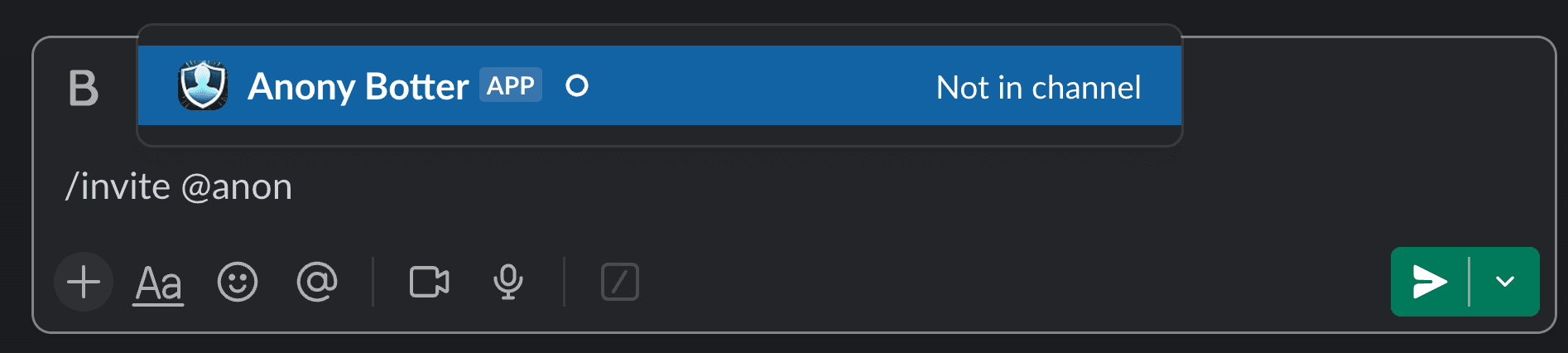
- Invite it to private channels. Type
/invite @Anony Botterin each private channel you want to use. Public channels work right away. - Show your team how to post. The command is
/anony. There are also shortcuts: "Send anonymous message", "Poll Anonymously" and, from a message's ⋯ menu, "Reply anonymously". Our step-by-step guide to sending an anonymous message is easy to share. - Set your rules. In the app's Home tab, admins can turn off anonymous replies, block @here and @channel in anonymous posts, and hide "Also send to channel" on anonymous replies. All three are free. Anonymous replies stay on until an admin turns them off, and the other two stay off until an admin turns them on.
- Remove Anonymous Bot when you're ready. Cancel its subscription first if you have one.
Frequently asked questions
Is Anonymous Bot the same as OpenSay's Anonymous Messaging Bot?
No. Anonymous Bot is a separate Slack app built by Fernando Falci and sold at anonymousbot.com. Anonymous Messaging Bot is OpenSay's app, which used to be called AnonymityBot. The names are close, so check the developer on the Slack Marketplace listing before you install. This page compares Anony Botter with Anonymous Bot, and we have a separate page for OpenSay.
Is Anonymous Bot free?
Yes, it has a free-forever plan. As of November 2026, its site lists up to 100 anonymous messages a month, unlimited channels and unlimited team size, but only in public channels. Thread replies start on Pro at $50 a month billed yearly, and private channels need Business at $100 a month billed yearly. Anony Botter's free plan includes private channels and thread replies.
Does Anonymous Bot support anonymous polls?
Not that we could find. Neither its Slack Marketplace listing nor its home page listed polls when we checked in November 2026. Anony Botter has anonymous polls with 2 to 5 options and live totals. The free plan allows 1 poll per day, and Plus and Enterprise are unlimited. Slack shows only the totals.
Which is cheaper for a 50-person team?
Anony Botter, in both cases. Anonymous Bot's Pro plan covers up to 25 different people who ever post, counted over all time, at $50 a month billed yearly ($600 a year). Once a 26th person posts, you need Business at $100 a month billed yearly ($1,200 a year). Anony Botter Plus is $86.40 a year at any size, and Enterprise is $323.
Can admins see who sent an anonymous message in either app?
Not in Anonymous Bot, which lists no reveal feature. In Anony Botter, admins can't see senders unless the workspace is on Enterprise and audit mode is on. Audit mode is off by default, shows senders a notice before they post, and only covers messages sent while it's on. Owners, admins and moderators then see the author in the message details.
Does Anony Botter work in private channels on the free plan?
Yes. Anony Botter posts in public and private channels on every plan, including Free. Public channels work right away. For a private channel, invite the app first by typing /invite @Anony Botter in that channel. On Anonymous Bot, private channels are part of the Business plan, which costs $100 a month billed yearly or $120 monthly.
Do my old Anonymous Bot messages disappear if I switch?
Removing a Slack app doesn't normally delete messages it already posted, but check with Anonymous Bot's developer. There's nothing to import into Anony Botter. You can run both apps side by side while your team gets used to /anony, then remove Anonymous Bot when you're ready. Cancel its subscription first if you have one.