Use case
Slack Anonymous Questions: Run an Anonymous Q&A for Leadership
Updated November 20, 2026. Competitor prices checked November 2026.
Short answer
Install Anony Botter, create an #ask-leadership channel, and have people type /anony to post questions there. Each question appears as posted by the Anony Botter app, not the asker. On Enterprise, moderators can approve questions before they post without seeing who asked. Free allows 20 posts to start, then 3 per day per workspace.
Most all-hands meetings end the same way: "Any questions?" followed by silence. People have questions. They just don't want their name on the hard ones, especially in front of the people who decide their next review.
An anonymous Q&A channel in Slack fixes that one problem. This page covers how it works with Anony Botter, how to set it up, how to moderate it, and who can see what. If you're planning a live session, read our guide on how to run an anonymous AMA or town hall for the run-of-show before, during and after the meeting.
How do anonymous questions work in Slack?
Slack doesn't have anonymous posting built in. Every normal message is tied to a member ID, and Slack's Workflow Builder forms name the person who filled them out. An app like Anony Botter gets around this by posting the question itself, so the channel shows the app instead of the person.
What happens when someone asks a question
- They type
/anonyin Slack, or pick the "Send anonymous message" shortcut. - A "Send anonymously" window opens. They choose the channel, such as #ask-leadership, and write the question.
- They hit send. On Free and Plus, the question posts right away. On Enterprise with approval turned on, it goes to moderators first.
- The question appears in the channel, posted by the Anony Botter app.
What people in the channel see
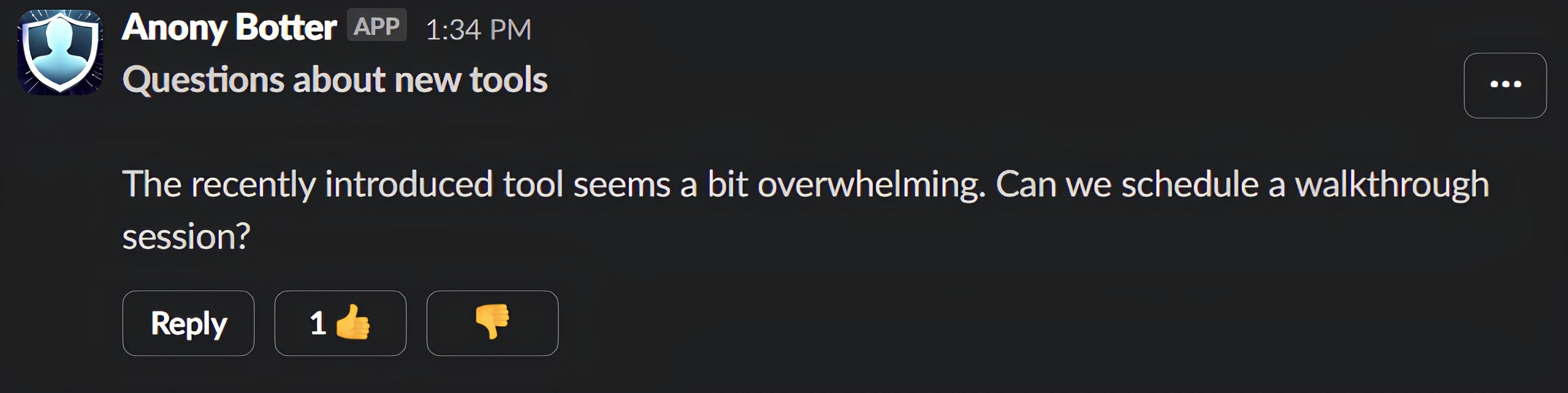
They see a message from "Anony Botter" with Slack's APP label, like the one at the top of this page. The asker's name, photo and status don't appear on the post. Under each question are three buttons: Reply, thumbs-up and thumbs-down.
How do you set up an anonymous Q&A channel in Slack?
It takes about five minutes and five steps. You create a dedicated channel, install the app, invite it if the channel is private, pin the rules, and announce it. Nothing here needs a paid plan, though busy channels will hit the free daily limit.
- Create the channel. Call it something obvious, like #ask-leadership or #all-hands-questions. A public channel lets everyone read the questions and answers, which is usually the point.
- Install Anony Botter. Add it from the install page. It works in public channels straight away.
- Invite the bot to private channels. If you made the channel private, type
/invite @Anony Botterin it. Without the invite, the bot can't post there. - Pin the rules. Keep it to four lines: what the channel is for, who answers and by when, what gets declined or hidden, and whether audit mode is on. Being upfront about audit mode matters most.
- Announce it. Post in #general or your all-hands channel. Tell people to type
/anony, pick #ask-leadership, and send. Mention that the question will show the app, not their name.
Here's a pinned message you can adapt:
Ask leadership anything here with /anony. Questions post as Anony Botter, not you. The exec team answers in the thread within a week. Personal attacks and questions naming individual coworkers get removed. Audit mode is off.
Two optional free settings help here. "Block @here and @channel" stops anonymous posts from pinging everyone, and "Hide 'Also send to channel'" keeps anonymous thread replies inside the thread. Both are off by default and apply only to anonymous posts made through Anony Botter.
How do you moderate anonymous questions?
It depends on the plan. Every plan has community flagging with the thumbs-down button. Plus sends flagged-message alerts to a private channel. Enterprise adds an approval queue, so nothing reaches #ask-leadership until a moderator approves it, and approving never reveals who asked.
| Plan | Moderation for a Q&A channel |
|---|---|
| Free | Community thumbs-down flagging with auto-hide. Workspace owners and admins can flag or hide any anonymous message. |
| Plus | Everything in Free, plus flagged-message alerts sent to a private channel when someone reports a message. |
| Enterprise | Everything in Plus, plus the approval queue, unlimited moderators, a channel whitelist and AI tools such as banned topics and a tone coach. |
Approve questions before they post (Enterprise)
With approval on, every anonymous question goes to a private approval channel first. Moderators approve it and it posts to #ask-leadership, or they decline it and it doesn't post. The approval step doesn't show who wrote the question. A declined question isn't posted, and the asker isn't notified.
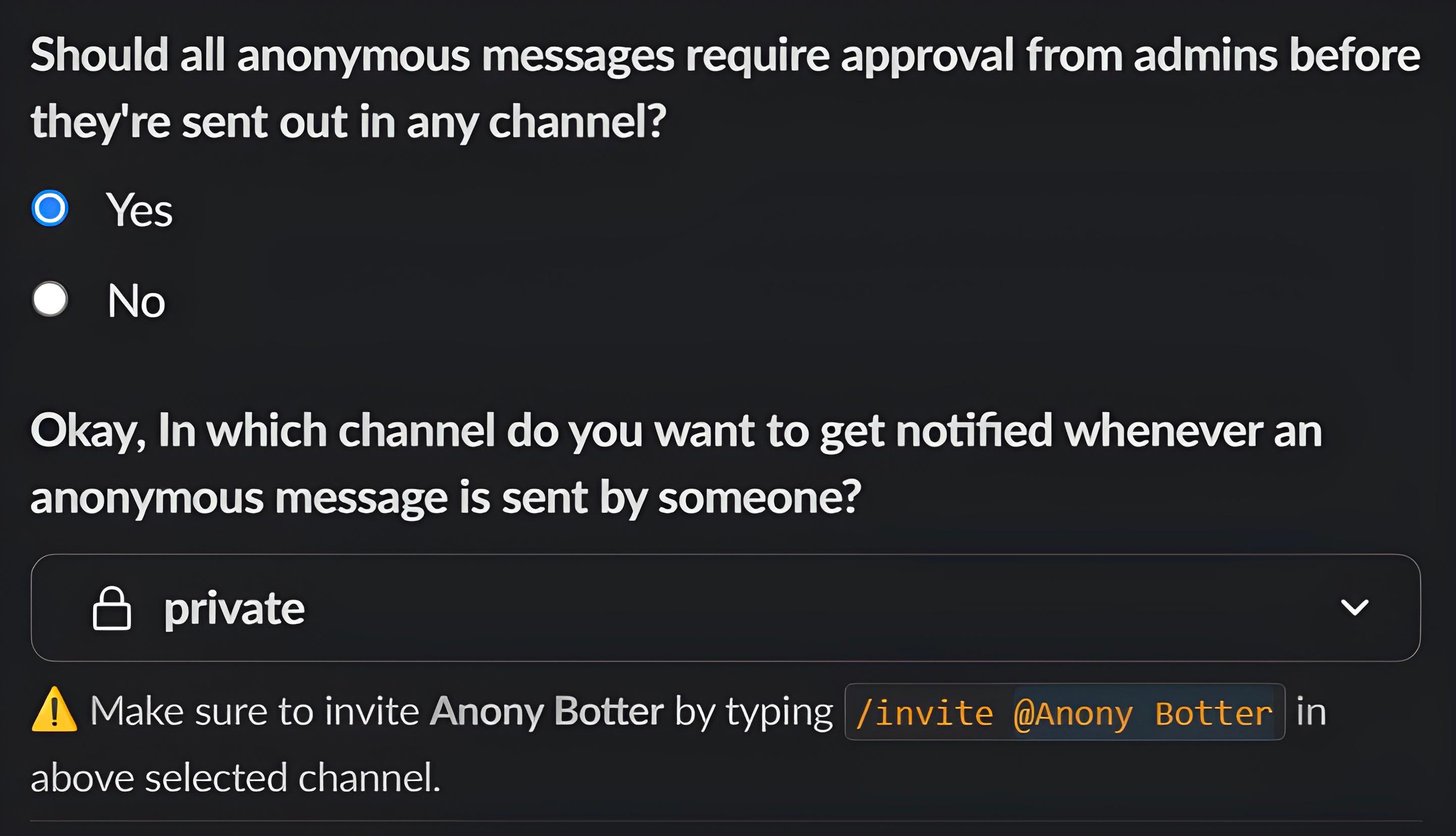
Since askers aren't told about declines, say in your pinned rules what gets declined. Otherwise people may assume the question was ignored. You can install Anony Botter on Enterprise to turn on the approval queue.
Community flagging on every plan
On Free and up, the thumbs-down button doubles as a flag. Once a question has at least 5 votes and 51% or more disapproval, it's hidden automatically. Owners and admins can also hide a message straight away. For a channel aimed at leadership, that's a reasonable safety net against the occasional bad-faith post.
Flagged-message alerts on Plus
Community flagging works on its own, but you might not notice it happen. Plus sends an alert to a private channel whenever someone reports a message, so whoever runs the Q&A sees problems as they come up.
How do leaders answer anonymous questions?
Leaders answer in the question's thread under their own names. That keeps each answer attached to its question, so anyone scrolling #ask-leadership later sees both. The asker can follow up in the same thread without revealing themselves, which turns a one-way drop box into a conversation.
- Anonymous follow-ups (every plan). The asker taps Reply on the question, or uses the "Reply anonymously" message shortcut, and the follow-up posts as the app. On Free, replies count toward the daily limit. Admins can turn anonymous replies off, but for a Q&A channel you'll want them on.
- Reply-notification DMs (Plus). The asker gets a DM when someone replies, and so do earlier anonymous repliers in the thread. Each DM has a one-click mute. Admins can turn these off. These DMs sit in the asker's own Slack DMs, so your company's retention and export rules cover them.
- Thread pseudonyms (Plus). Anonymous repliers get consistent pseudonyms within a thread, and the asker gets an Original Poster badge. Leaders can tell the asker's follow-up apart from other anonymous replies. See thread pseudonyms and the OP badge.
One practical tip: answer the uncomfortable questions first. When people see that a pointed question got a real answer, more of them ask the next one.
Can people upvote anonymous questions?
Yes, in a simple way. Every anonymous question has a thumbs-up button, and the button shows how many people have tapped it. It gives leaders a quick read on which questions people care about before a session. Slack shows the count, not who tapped it.
It's a button on each message, not a ranking system. Anony Botter doesn't sort the channel or build a leaderboard, so the host scans the channel and picks. For most all-hands channels with a dozen or so questions, that's enough.
Which plan do you need for anonymous Q&A?
Free works for trying it out or for a quiet channel. Plus suits regular town halls, because the free limit is shared across the whole workspace. Enterprise is for teams that want every question approved before it posts. Pricing is per workspace, not per user.
| Plan | Price | What you get for anonymous Q&A |
|---|---|---|
| Free | $0 | 20 anonymous posts to start, then 3 per day for the workspace (questions, thread replies and polls all count). Anonymous follow-ups, thumbs-up and thumbs-down buttons, community auto-hide, @here blocking. |
| Plus | $8/month, or $7.20/month billed annually ($86.40/year) | Unlimited questions and replies, reply-notification DMs to askers, thread pseudonyms with an OP badge, per-user thread mute, flagged-message alerts. |
| Enterprise | $29.99/month, or $26.92/month billed annually ($323/year) | Everything in Plus, plus the approval queue, unlimited moderators, a channel whitelist, audit mode and AI moderation tools. |
The full feature list is on the pricing page.
Who can see who asked?
In Slack, nobody sees the asker by default: not coworkers, not leaders, not moderators approving questions. Workspace admins can only see authors through Enterprise audit mode, which is off by default and warns senders first. More in is Anony Botter really anonymous?
| Who | Can they see who asked? |
|---|---|
| Coworkers and leaders in the channel | No. They see the Anony Botter app. |
| Moderators in the approval channel (Enterprise) | No. Approving or declining doesn't reveal the author. |
| Workspace owners and admins | No, unless Enterprise audit mode was on when the question was sent. Senders see a privacy notice while it's on. |
| Slack channel exports | Channel exports show the app, not the asker. But exports that include DMs also include the bot's DMs to the asker (Plus reply notifications, Enterprise AI review DMs that may quote the draft), which can link them to the question. |
Software can hide a name, but not what someone writes. In a small team, a detail only one person knows can give them away, so remind people to keep questions about the issue.
Why do anonymous questions matter?
Because many employees don't feel their opinions count. Gallup found that only 28% of U.S. employees strongly agree their opinions count at work, in a Q2 2025 survey of 17,660 workers (Gallup, 2025). An anonymous channel removes one barrier: attaching your name to an awkward question.
The pattern shows up outside the U.S. too. In a survey of 2,000 UK working adults published in February 2026, MHFA England reported that 45% feel unable to raise mistakes or risks at work (MHFA England, 2026). That's a charity survey, and it doesn't name the pollster, so treat it as a signal, not a benchmark.
Anonymity won't fix a culture by itself, though. What changes behavior is people watching leaders answer hard questions properly, week after week. The channel just makes it easier to ask.
What other anonymous Q&A tools work with Slack?
Two are worth knowing about. OpenCulture is built for anonymous questions and includes moderation on every paid tier. Simple Poll has a Q&A poll type with upvotes. Both do some things better than Anony Botter, and both have trade-offs. Prices below were checked on the vendors' sites in November 2026.
- OpenCulture. OpenCulture offers anonymous questions with an optional AI filter and human moderators who approve questions before they post. It says the submitter's identity is never shown, even to admins. It costs $30/month (up to 300 members) or $60/month (300+), checked November 2026. There's a 14-day trial but no free plan, and its page doesn't list question upvoting.
- Simple Poll Q&A. Simple Poll's Q&A poll lets people post questions and upvote them, and adding "anonymous" hides who asked. It's a strong fit if ranked questions matter most. It has no moderation or approval queue, and no anonymous thread replies. Its free tier caps responses at 100 a month, and Premium starts at $49/month billed annually for 1 to 24 members (Simple Poll pricing, checked November 2026). Its glossary tags the anonymous Q&A example as Premium, so check before relying on the free tier.
Anony Botter's trade-off is different. Questions are ordinary channel posts with anonymous threads, not a separate Q&A list, and pre-approval needs Enterprise. For a wider comparison, see the guide to the best anonymous Slack apps.
Frequently asked questions
Can you ask anonymous questions in Slack without an app?
No. Slack has no built-in way to post anonymously. Every message is tied to your member ID, so changing your display name doesn't hide you, and Slack's Workflow Builder form posts mention the person who filled them out. To let people ask questions without their name attached, you need a third-party app such as Anony Botter, OpenCulture or Simple Poll's Q&A poll.
Can moderators see who asked a question in the approval queue?
No. On Enterprise, approval sends each anonymous question to a private approval channel first. Moderators read it and approve or decline it, but the approval step doesn't show who wrote it. Approval and audit mode are separate settings, so turning on approval doesn't give anyone a way to see authors.
What happens to a question that gets declined?
It isn't posted, and the person who asked isn't notified. From the asker's side, the question simply never appears. That's why it helps to pin a short rule in the channel explaining what gets declined, such as personal attacks or questions naming individual coworkers, so people know to rephrase and try again.
Can people upvote anonymous questions in Slack?
Each anonymous question has a thumbs-up button, and the button shows how many people have tapped it. That gives leaders a quick signal of which questions people care about. Anony Botter doesn't sort or re-order questions by votes, so whoever runs the session scans the channel and picks. If a ranked question list matters most, Simple Poll's Q&A poll is built around upvotes.
Is the Free plan enough for an all-hands Q&A?
For a pilot, often yes. Free gives your workspace 20 anonymous posts to start, then 3 per day, and questions, anonymous thread replies and polls all count toward that. The limit is shared across the whole workspace, so a busy town hall can use it up quickly. Plus removes the limit for $8/month, or $7.20/month billed annually.
Can admins find out who asked a question?
Not in Slack, unless your workspace is on Enterprise and an admin turned on audit mode before the question was sent. Audit mode is off by default, shows senders a privacy notice before they post, and only covers messages sent while it's on.
Can the asker follow up on an answer and stay anonymous?
Yes. The asker can tap Reply on the anonymous question, or use the Reply anonymously message shortcut, to post in the thread as the app. On Plus, reply-notification DMs tell the asker when someone answers, and thread pseudonyms mark their follow-ups with an Original Poster badge so leaders can tell the asker apart from other repliers.
Can I limit anonymous questions to one channel?
On Enterprise, yes. The channel whitelist restricts anonymous posting to the channels you approve, such as #ask-leadership. On Free and Plus, people can use /anony in any public channel, and in any private channel the bot has been invited to. In that case, your pinned rules and announcement are what steer questions to the right place.