
Anonymous feedback for Slack
Anonymous Feedback for Slack: Messages, Polls and Thread Replies
Prices checked November 20, 2026
Short answer
Slack has no built-in way to give anonymous feedback. Anony Botter adds it: people send anonymous messages, polls and thread replies to Slack channels, posted by the app instead of their account. It's free forever (20 posts to start, then 3 a day, polls 1 a day). Plus is $7.20/month billed annually for unlimited messages and polls, priced per workspace.
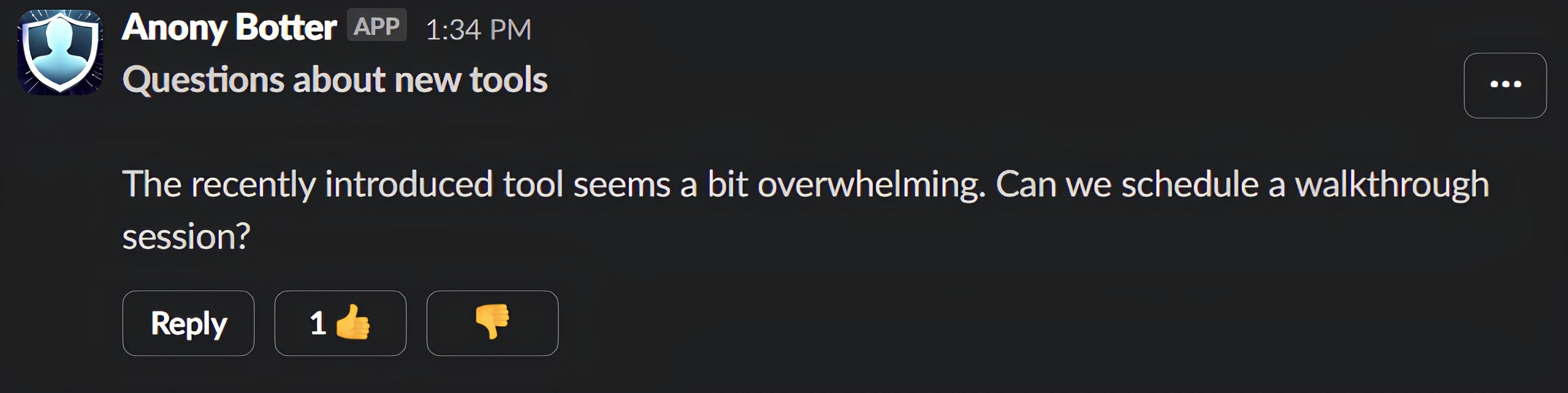
Slack is where most of your team's day happens, so it's the obvious place to ask for honest feedback. The catch is that every Slack message carries a name. Slack offers no built-in option for anonymous posts, and its workflow forms aren't anonymous to the people who run them. Slack's workflow activity log lets workflow managers filter runs by person over the last 90 days on paid plans (Slack Help, accessed November 2026).
This page covers what Anony Botter adds, how moderation works on each plan, what it costs, and exactly who can see who sent what. If you want a step-by-step playbook instead of a product overview, read our guide on how to collect anonymous feedback in Slack.
What can you do with Anony Botter?
Anony Botter gives a Slack workspace four anonymous tools: messages to any channel, polls with 2 to 5 options, thread replies on any message, and thumbs buttons that let the channel hide abuse. Every post appears under the app's name with Slack's APP label, so your name, photo and status never show on it.
Anonymous messages to any channel
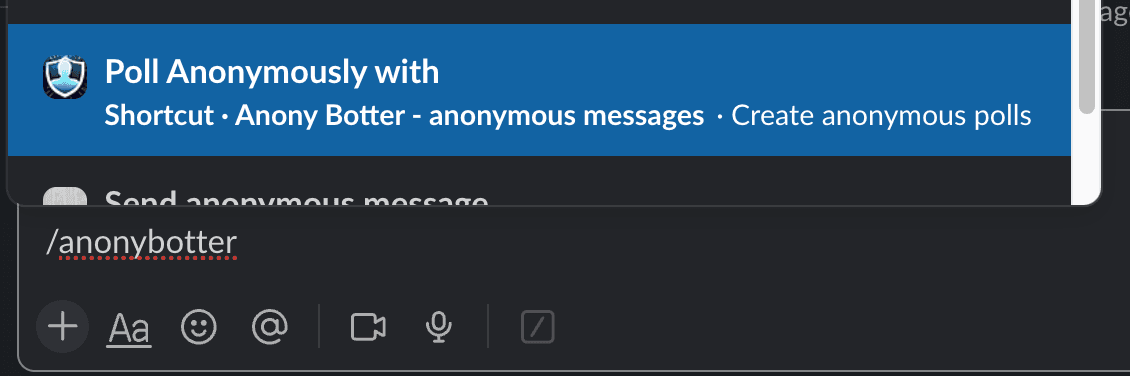
Type /anony or use the "Send anonymous message" shortcut, pick a channel, write and send. Public channels work right away. For a private channel, someone in it invites the bot first with /invite @Anony Botter.
Anonymous polls
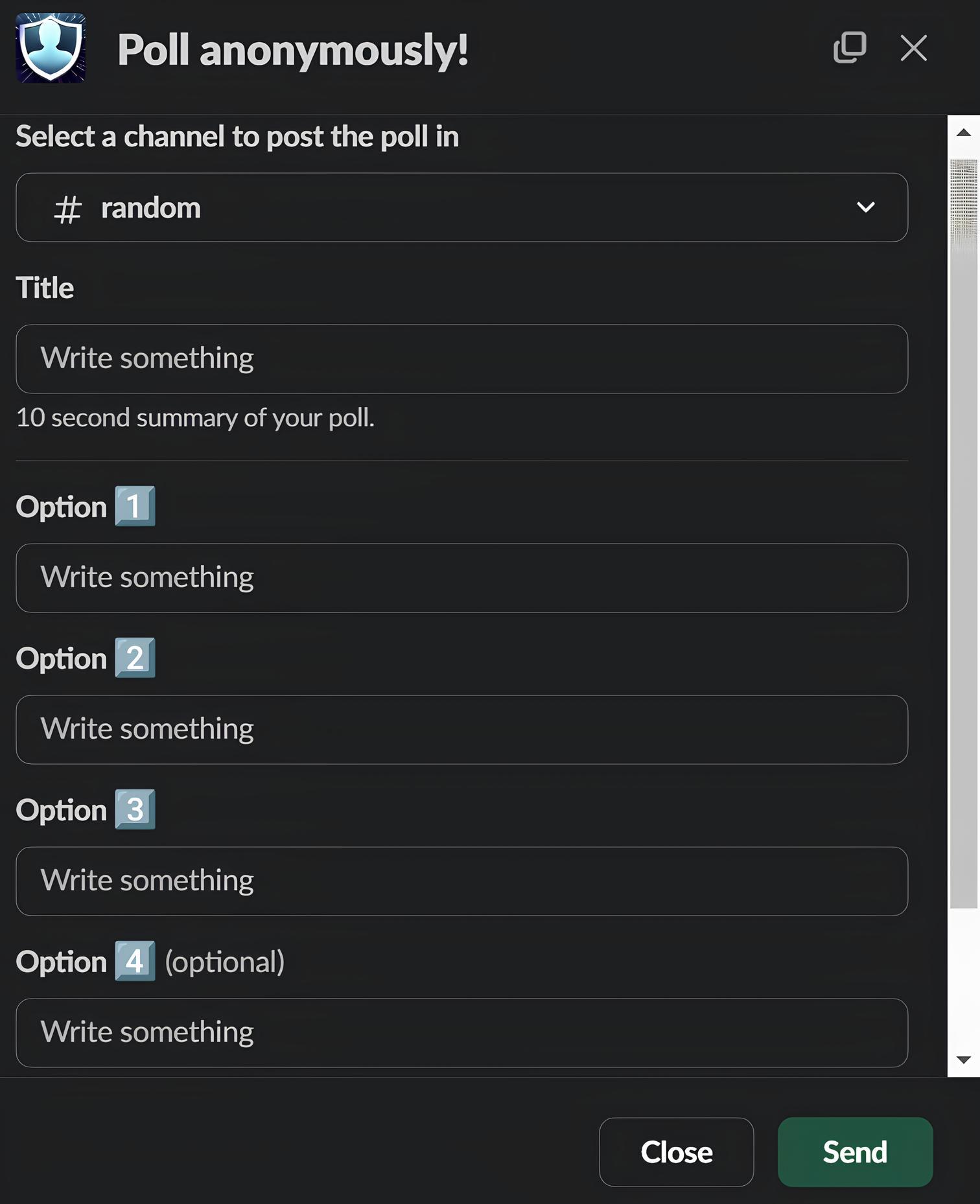
Use the "Poll Anonymously" shortcut or the button in App Home. Each poll has a question and 2 to 5 options with live totals. Slack shows only the totals, so nobody in the channel sees who picked what. Free workspaces can run 1 poll per day, and Plus and Enterprise are unlimited.
Polls are deliberately simple. There's no scheduling, closing date, export or free-text question, so they suit quick checks rather than formal surveys.
Anonymous thread replies on any message
Every anonymous message has a Reply button. On any other message, including one a manager posted under their own name, open the ⋯ menu and choose the "Reply anonymously" shortcut. Admins who want named replies can switch anonymous replies off. On Plus, thread pseudonyms with an Original Poster badge keep long anonymous threads readable.
Thumbs-up and thumbs-down buttons
Anonymous messages carry 👍 and 👎 buttons. The thumbs-down votes double as community flagging: once a message has at least 5 votes and 51% or more disapproval, it's hidden automatically. That works on every plan, including Free.
How does anonymous feedback in Slack work?
It takes three steps. Install the app, type /anony, then pick a channel and send. The post appears from Anony Botter with Slack's APP label. On the Free plan, your workspace gets 20 anonymous posts to start, then 3 per day.
- Install Anony Botter. Use the Add to Slack button or the Slack Marketplace listing, and approve the permissions.
- Type
/anony. In any Slack conversation, type/anony, or open the shortcuts menu and choose "Send anonymous message". - Pick a channel and send. Choose where the feedback should go, write it and send. It posts as Anony Botter, not as you.
Private channels need one extra step: run /invite @Anony Botter in the channel first. Polls start from the "Poll Anonymously" shortcut in the same menu.
How do teams use anonymous feedback in Slack?
Most teams start with one channel and one clear purpose. The five setups below cover the common ones, and all of them use the same three tools: anonymous messages, polls with 2 to 5 options, and anonymous thread replies. Pick the one closest to your problem and follow the linked guide.
- An always-on suggestion box. A #suggestions channel where anyone can post an idea and leaders answer in the thread. See the Slack suggestion box setup.
- Questions for leadership. Collect questions before an all-hands or AMA so the hard ones actually get asked. See anonymous questions in Slack.
- Sprint retrospectives. Gather what went wrong before the meeting, then poll the team on what to fix first. See anonymous sprint retrospectives in Slack.
- Pulse questions. Ask one quick poll question, such as how this week's workload felt, and watch the totals come in. For wording ideas, see these anonymous employee survey questions. On Free, that's 1 poll per day.
- Reporting concerns. A private channel with moderator approval (Enterprise), for issues people won't raise under their own name. See the anonymous reporting channel for Slack. Keep your formal reporting channels alongside it.
How do you moderate anonymous feedback?
Every plan includes community flagging: 👎 votes hide a message automatically at 5 or more votes and 51% disapproval. Plus sends an alert to a private channel when someone reports a message. Enterprise adds a moderator approval queue, so nothing posts until someone approves it, plus AI checks for banned topics and tone.
| Moderation and thread controls | Free | Plus | Enterprise |
|---|---|---|---|
| Community 👎 flagging with auto-hide | Yes | Yes | Yes |
| Owners and admins can flag or hide a post | Yes | Yes | Yes |
| Block @here and @channel in anonymous posts | Yes | Yes | Yes |
| Hide "Also send to channel" on anonymous replies | Yes | Yes | Yes |
| Require real names for thread replies | Yes | Yes | Yes |
| Flagged-message alerts to a private channel | No | Yes | Yes |
| Per-user thread mute | No | Yes | Yes |
| Thread pseudonyms with an Original Poster badge | No | Yes | Yes |
| Moderator approval queue for messages and polls | No | No | Yes |
| Unlimited extra moderators | No | No | Yes |
| Channel whitelist | No | No | Yes |
| AI banned topics, tone coach and moderator summary | No | No | Yes |
Two details matter for trust. Approving or declining a post doesn't reveal who wrote it. A declined post simply isn't published, and the author isn't notified. Also, the @here and "Also send to channel" settings are off by default and apply only to anonymous posts made through Anony Botter, not to normal Slack messages.
For each setting in detail, see the Slack admin guide to anonymous message controls.
Who can see who sent feedback?
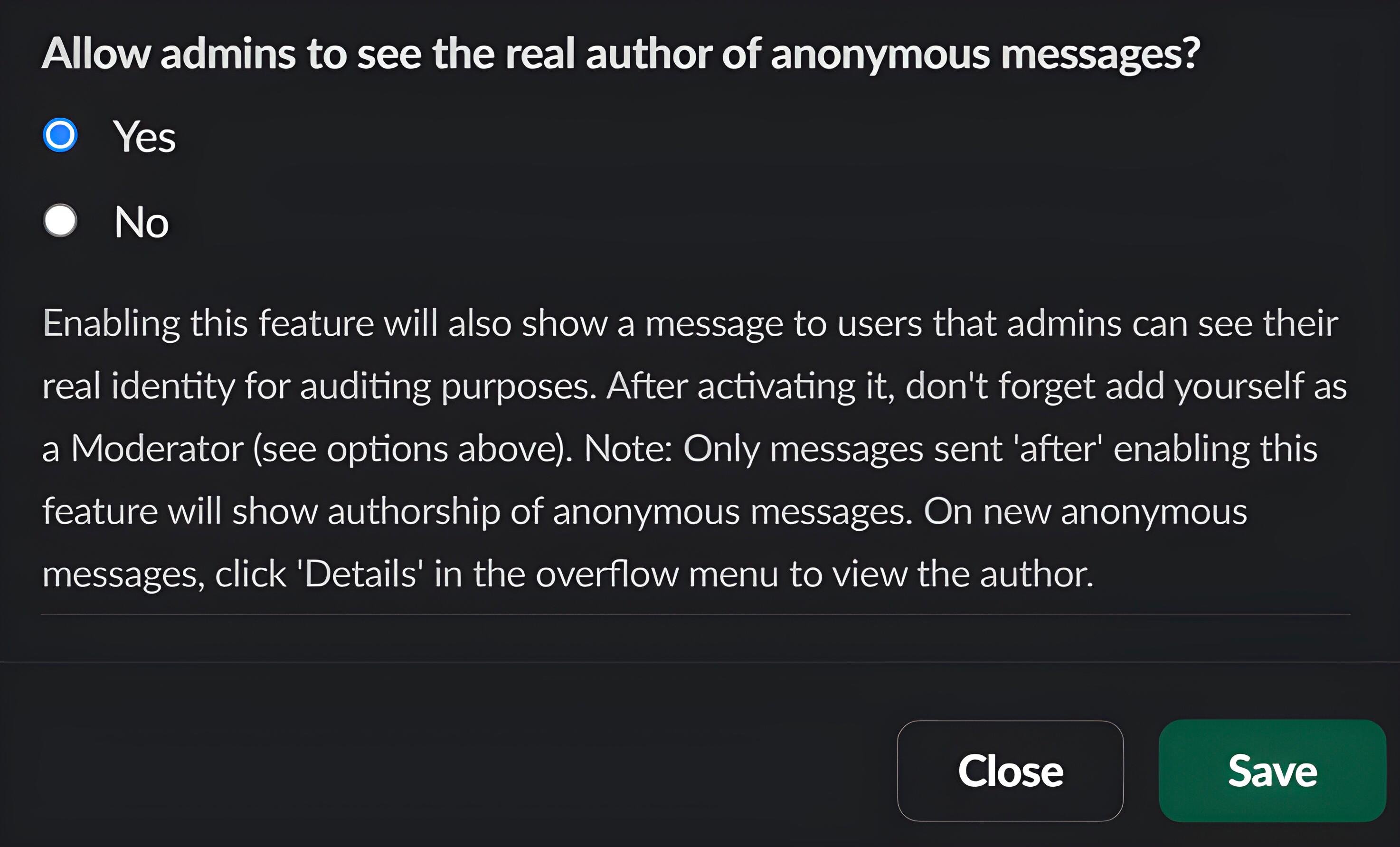
In Slack, nobody can by default: members and admins see the Anony Botter app as the author. Admins can only see senders through Enterprise audit mode, which is opt-in and shows senders a notice before they post.
Being exact about this matters. In the EY Global Integrity Report 2024, 54% of people who had used a whistleblowing hotline said they faced pressure not to use it. People weigh the risk before they speak up, so here's the full picture.
| Who | Can they see the sender? | Details |
|---|---|---|
| Channel members | No | The post shows the Anony Botter app with Slack's APP label. Polls show only vote totals. |
| Workspace owners and admins | Only with audit mode | Audit mode is Enterprise only and off by default. While it's on, senders see "Privacy Notice: Workspace admins can see who sends anonymous messages." It covers only messages sent while it's on. Owners, admins and moderators then see the author through the message's ⋯ menu, under Details. |
| Slack exports | Not for channel posts | Slack records the post as a bot message, so channel exports show the app as the author (see Slack's export format guide). DMs the bot sends to the author, such as reply notifications on Plus or AI review DMs on Enterprise, sit in that person's DMs and follow your company's Slack retention and export rules. |
Audit mode never reaches back. Messages sent before it was turned on, or while it was off, stay anonymous even if an admin enables it later. The full breakdown, including exports by Slack plan, is in is Anony Botter really anonymous?
How much does anonymous feedback in Slack cost?
Anony Botter is free forever for light use and priced per workspace, not per user. Plus costs $7.20 a month billed annually ($86.40 a year), or $8 month to month, for unlimited messages and polls. Enterprise is $26.92 a month billed annually, or $29.99 monthly, and adds approval, audit and AI moderation tools.
| Per workspace | Free | Plus | Enterprise |
|---|---|---|---|
| Price | $0, forever | $8/month, or $7.20/month billed annually ($86.40/year) | $29.99/month, or $26.92/month billed annually ($323/year) |
| Anonymous posts | 20 to start, then 3 per day (messages, replies and polls all count) | Unlimited | Unlimited |
| Anonymous polls | 1 per day | Unlimited | Unlimited |
| Moderation | Community flagging, @here and broadcast controls, reply control | Adds flagged-message alerts, thread mute, pseudonyms and reply-notification DMs | Adds approval queues, unlimited moderators, channel whitelist, audit mode and AI tools (banned topics, tone coach, auto-translate, moderator summary) |
| Get started | Add to Slack free | Start Plus | Start Enterprise |
Because billing is per workspace, a 15-person team and a 500-person company pay the same price. On Free, the daily limit resets at midnight UTC. When it's reached, the sender sees a notice, and the installer and workspace owners get a DM that doesn't say who tried. The full feature list is on the pricing page.
How do you turn anonymous feedback into action?
Reply, decide and report back where people can see it. Collecting feedback is the easy part: Gallup found only 8% of employees strongly agree their organization acts on survey results, and 38% don't know whether it does (Gallup, 2024). Feedback that disappears teaches people to stop sending it.
The starting point is low. Gallup's engagement indicator shows 26% of U.S. employees feel their opinions count at work, as of August 2026. In a 2023 article on employee voice, Gallup also described a client that collected over 9,000 idea submissions and did nothing with them.
Here's a simple routine that fits Slack:
- Acknowledge it in the thread. Reply under the anonymous post as yourself within a few days. Everyone in the channel sees the answer, and on Plus the author gets a DM that someone replied.
- Ask follow-up questions in public. The author can answer with the Reply button and stay anonymous, so you never need to know who they are to understand the problem.
- Sort each item. Doing it, not doing it (and why), or need more input. A clear "no, because…" still closes the loop.
- Post a "you said, we did" round-up. Pick a fixed rhythm, such as every two weeks, and post it in the same channel.
- Check whether the change worked. Run a quick anonymous poll a few weeks later and compare the totals.
The round-up is the step most teams skip, and it's the one people notice. It shows that posting anonymously led somewhere.
What other anonymous feedback apps work with Slack?
Several apps do something similar, and some do parts of it better. OpenSay and Abot are the closest matches for anonymous posts, while Simple Poll and Polly are stronger for structured surveys. The prices below come from each vendor's own pricing page, checked November 2026.
- OpenSay (listed as "Anonymous Messaging Bot"): anonymous posts, replies, polls, thread pseudonyms and weekly feedback prompts, which we don't offer. Its free Hobby tier allows 10 posts and 10 replies a month, and Business is $79/month (OpenSay pricing, checked November 2026).
- Abot: anonymous feedback to channels and by DM, plus polls, and it's free for education. Pro is $19/month for up to 50 members (Abot pricing, checked November 2026). Moderation starts on its Enterprise tier, and its Marketplace listing notes admins on Business+ or Enterprise Grid may be able to identify senders through export logs.
- Simple Poll: better for structured polls and surveys, including anonymous short-text answers inside a survey. It has no standalone anonymous messages. Free covers 100 responses a month, and Premium starts at $49/month billed annually for 1 to 24 members (Simple Poll pricing, checked November 2026).
- Polly: surveys and a suggestion box template with anonymity and moderation on by default. Anonymity starts on Pro at $29/month per license, and the free plan has none (Polly pricing, checked November 2026).
For a side-by-side table, read our guide to the best anonymous Slack apps, or compare directly with OpenSay and Abot.
Questions about anonymous feedback in Slack
Can you send anonymous feedback through Slack?
Not with Slack alone. Slack offers no built-in option for anonymous posts, and every message is tied to a member account. An app adds it. With Anony Botter, you type /anony, pick a channel and send, and the message appears as posted by the app. Polls and thread replies can be anonymous too. The Free plan covers 20 posts to start, then 3 per day.
Can Slack admins see who sent anonymous feedback?
Not by default. Slack shows the post as coming from the Anony Botter app, and channel exports show the app too. The only way admins see a sender is Enterprise audit mode. It's off by default, senders see a privacy notice while it's on, and it only covers messages sent while it was on. Owners, admins and moderators then see the author under the message's Details.
Is anonymous feedback in Slack truly anonymous?
It's anonymous to your coworkers. Writing style, timing and very small channels can also give people away.
How much does Anony Botter cost?
Pricing is per workspace, not per user. Free costs nothing: 20 anonymous posts to start, then 3 per day, with polls capped at 1 per day. Plus is $8 a month, or $7.20 a month billed annually ($86.40 a year), for unlimited messages and polls. Enterprise is $29.99 a month, or $26.92 a month billed annually, and adds the approval queue, audit mode and AI moderation.
What are the limitations of using Slack for anonymous feedback?
Slack suits short, conversational feedback. Anony Botter polls have 2 to 5 options with live totals, with no scheduling, export, analytics or free-text survey form. If you need benchmarked engagement surveys with reporting thresholds, use a dedicated survey tool. Small channels also make people easier to guess, and the Free plan limits posts to 3 per day after the first 20.
What is the best Slack bot for anonymous employee feedback?
It depends on what you need. Anony Botter fits teams that want anonymous messages, polls and replies in their existing channels, with flat per-workspace pricing and clear admin rules. OpenSay adds weekly feedback prompts. Abot also takes anonymous feedback by DM. Simple Poll and Polly suit structured surveys. Compare free tiers and whether each has an approval queue.
Are Slack anonymous feedback apps HIPAA compliant?
Usually not. The Slack Marketplace listings for Abot and OpenSay both say they aren't HIPAA compliant, and Anony Botter doesn't claim HIPAA compliance or any security certification either. Don't use an anonymous Slack app for protected health information or for reports that need a regulated channel. Keep those in the systems your compliance team has approved.
How do I send leadership anonymous feedback in Slack?
Post it in a channel leadership reads. Type /anony, pick the channel, such as #ask-leadership, and send. Leaders reply in the thread as themselves, and you can follow up anonymously with the Reply button. On Plus, you get a DM when someone replies. If the channel is private, someone first invites the bot with /invite @Anony Botter.