
Comparison
Anony Botter vs Honestbot: Which Anonymous Slack App Fits?
Updated November 2026
Short answer
Honestbot, listed on Slack as Anonymous Honestbot by Konrad Bak IT, is a simple anonymous messaging app with anonymous DMs and a free plan for up to 50 users. Anony Botter has anonymous thread replies, polls and moderation instead. Anony Botter Plus costs $8/month ($7.20 billed annually) at any team size; Honestbot Pro costs $50/month for unlimited users.
This page compares Anony Botter with Honestbot, the Slack Marketplace app listed as "Anonymous Honestbot" by Konrad Bak IT. Its website is honestbot.app. If you searched for honest.bot, note that the domain doesn't load (checked November 2026); Honestbot's site is honestbot.app.
We make Anony Botter, so keep that in mind as you read. We've tried to say plainly where Honestbot is the better pick. If you're weighing other apps too, read our Anony Botter vs OpenSay and Anony Botter vs Anonymous Bot comparisons.
What's the difference between Anony Botter and Honestbot?
Honestbot is a simple anonymous messaging app. Its free plan covers teams of up to 50 users with no other limits listed, and Pro costs $50 a month for unlimited users (honestbot.app, checked November 2026). Anony Botter adds thread replies, polls and moderation, and Plus costs $8 a month at any team size.
Here's the short version:
- Features: Honestbot has anonymous DMs, a 1:1 follow-up with the sender and per-person limits, which we don't. Anony Botter has thread replies, polls, community flagging and an approval queue, which Honestbot doesn't list.
- Price: Honestbot is free for teams of 50 or fewer. Above that, Honestbot Pro is $50 a month and Anony Botter Plus is $8.
- Simplicity: both are quick to start. Honestbot does less, which some teams will see as a plus.
How much does Honestbot cost compared with Anony Botter?
Honestbot's free plan is "free forever" for up to 50 users, and Pro costs $50 per workspace per month for unlimited users (honestbot.app/pricing, checked November 2026). Anony Botter Plus is $8 a month, or $7.20 billed annually, per workspace, whatever your team size.
| Plan | Anony Botter | Honestbot |
|---|---|---|
| Free plan | 20 anonymous posts to start, then 3 per day, shared by the whole workspace. Messages, thread replies and polls all count. Polls capped at 1 per day. No user cap. Public and private channels. | Free forever for up to 50 users. No message cap or other limits listed. |
| Entry paid plan | Plus: $8/month, or $7.20/month billed annually ($86.40/year). Unlimited messages and polls, any team size. | Pro: $50/month per workspace, unlimited users. Annual billing offered, but no annual price shown. Free trial with no card, length not listed. |
| Top plan | Enterprise: $29.99/month, or $26.92/month billed annually ($323/year). Approval queue, audit mode, AI checks. | Pro is the only paid plan listed |
| 30-person team | Free, within the shared allowance. Plus at $8/month ($86.40/year billed annually) for unlimited messages | Free, with no message cap listed |
| 200-person team | Plus: $8/month, or $86.40/year billed annually. Enterprise: $29.99/month, or $323/year | Pro: $50/month ($600/year at the monthly price; annual price not shown) |
| Billing basis | Flat per workspace, whatever the team size | Flat per workspace: Free up to 50 users, Pro for unlimited users |
| Refunds | 14-day money-back guarantee, per our refund policy | Not listed on its pricing page or terms. Payments go through Paddle. |
Prices checked November 23, 2026 on honestbot.app and our own pricing page. Vendors change prices, so check both before you buy.
For a 200-person team, Plus costs $96 a year at the monthly price, against $600 for Honestbot Pro at its monthly price. Paying annually brings Plus down to $86.40. Honestbot offers annual billing too, but its pricing page doesn't show that price, so the yearly gap may be smaller. Even Anony Botter Enterprise, at $29.99 a month, costs less than Honestbot Pro.
How do the free plans compare?
For a team of 50 or fewer, Honestbot's free plan is the better deal on volume. It lists no message cap. Anony Botter's free plan gives the whole workspace 20 posts to start, then 3 per day, which works out to about 90 in a 30-day month after the starter posts.
So if your 30-person team posts more than 3 times a day, Honestbot stays free while Anony Botter needs Plus at $8 a month. Our free plan has no user cap, though, and it includes thread replies, 1 poll per day and community flagging. Replies and polls count toward the same allowance.
Which features does each app have?
Honestbot's Slack Marketplace listing shows anonymous direct messages, a 1:1 follow-up with the anonymous sender, and admin limits on which channels and people can use it (checked November 2026). Anony Botter has anonymous thread replies, polls with 2 to 5 options, community flagging and an approval queue, none of which Honestbot lists.
| Feature | Anony Botter | Honestbot |
|---|---|---|
| Anonymous channel messages | Every plan | Listed |
| Private channels | Every plan (invite the app first) | Listed in its site examples (plan not stated) |
| Anonymous direct messages | Not offered | Listed |
| Anonymous thread replies | Every plan (count toward the Free allowance) | Not listed |
| Anonymous polls | 2 to 5 options with live totals. 1 per day on Free, unlimited on Plus | Not listed |
| Follow-up with the anonymous sender | Not offered. On Plus, anonymous authors can get a DM when someone replies anonymously in their thread | Listed: a 1:1 follow-up conversation with the sender |
| Limit use to specific channels | Enterprise (channel whitelist) | Listed (plan not stated) |
| Limit use to specific people | Not offered | Listed (plan not stated) |
| Community flagging | Free: community 👎 flagging that auto-hides a post. Plus: alerts to a private channel | Not listed |
| Moderator approval before a post goes live | Enterprise (messages, replies and polls) | Not listed |
| Audit mode | Enterprise only: off by default, senders see a notice first, covers only messages sent while it's on | Not listed |
| AI checks | Optional. Plus: toxicity scan. Enterprise: banned topics, tone coach, auto-translate, moderator summary | None. Its listing says it uses no LLMs |
"Not listed" means we couldn't find the feature on Honestbot's site or listing. It doesn't prove the app can't do it. Honestbot's pricing page doesn't split features by plan, so we can't say which of them need Pro.
What Honestbot does better
- No message cap on Free for small teams. Up to 50 users can post as much as they like without paying.
- Anonymous DMs. Honestbot lists anonymous direct messages. Anony Botter posts only to public and private channels.
- Private follow-up with the sender. Its listing describes a 1:1 follow-up conversation with the anonymous sender. On Anony Botter, the conversation happens in the thread, and on Plus the author gets a DM when someone replies anonymously. If you're setting up a reporting channel, our Slack whistleblower hotline page covers how teams use Anony Botter for that.
- Limits by person. Honestbot lets admins restrict use to specific channels and people. Anony Botter can restrict channels on Enterprise, but not people.
- No AI in the pipeline. Its listing says it uses no LLMs. Our AI checks are optional and off by default, but they exist.
What Anony Botter does better
- Anonymous thread replies. Use the Reply button on an anonymous post, or "Reply anonymously" on any message, on every plan.
- Anonymous polls. 2 to 5 options with live totals, 1 per day on Free and unlimited on Plus.
- Moderation that grows with you. Community 👎 flagging is free and hides a post once it gets at least 5 votes with 51% or more disapproval. Plus sends flag alerts to a private channel. Enterprise adds an approval queue for messages and polls, unlimited moderators and AI checks.
- Thread hygiene. Admins can block @here and @channel in anonymous posts and hide "Also send to channel" on anonymous replies. Both are free, off by default, and apply only to anonymous posts made through Anony Botter.
- Audit mode for compliance. On Enterprise, owners, admins and moderators can see the author of messages sent while audit mode is on. It's off by default, and senders see a notice before they post.
- Price above 50 users. Plus is $8 a month against $50 for Honestbot Pro, with a 14-day money-back guarantee.
Is Anony Botter a good Honestbot alternative?
Choose Honestbot if your team has 50 or fewer users and wants uncapped anonymous messages for free (honestbot.app, checked November 2026), or if you need anonymous DMs. Choose Anony Botter if you want thread replies, polls or moderation, or your team is over 50 and you'd rather pay $8 than $50 a month.
Choose Honestbot if
- Your team has 50 or fewer users and posts more than 3 times a day.
- You want people to send anonymous direct messages.
- Leaders need a private 1:1 follow-up with the anonymous sender.
- You need to limit which people can use the app.
- You don't want any AI features available, even optional ones.
Choose Anony Botter if
- You want anonymous thread replies and polls alongside messages.
- Your team is over 50 users, and you want unlimited messages for $8 a month, or $7.20 billed annually.
- You want community flagging, or a moderator to approve posts before they go live.
- You want to keep @here and @channel out of anonymous posts.
- You need audit mode for compliance, with senders warned before they post.
Compare all three Anony Botter plans on the pricing page.
How do you switch from Honestbot to Anony Botter?
Switching takes a few minutes and there's nothing to migrate. Honestbot's terms and pricing page list no refund policy (checked November 2026), so if you pay for Pro, time the change to your renewal date. Anony Botter paid plans come with a 14-day money-back guarantee. You can run both apps side by side in the meantime.
- Install Anony Botter. Use the free install link, or start on Enterprise if you need the approval queue from day one.
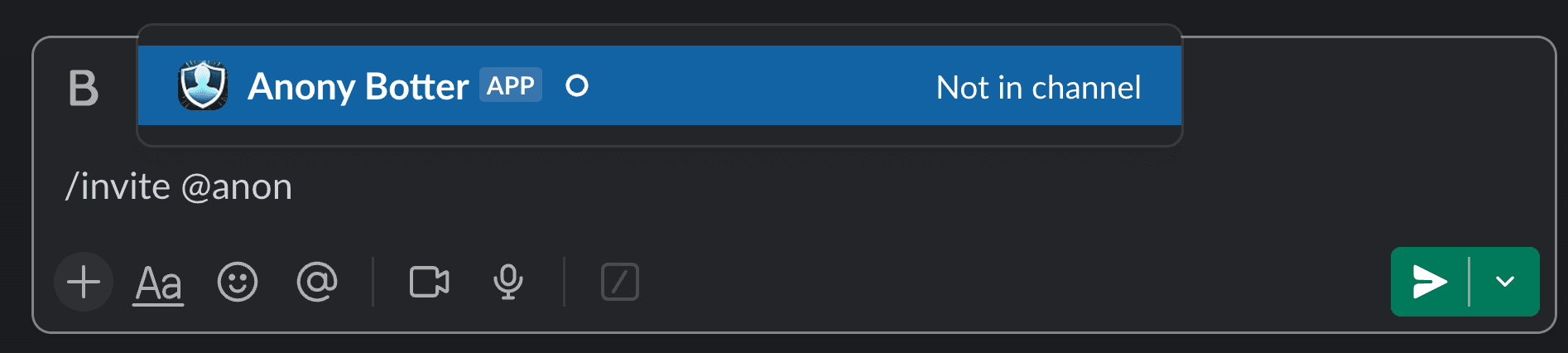
- Invite it to private channels. Type
/invite @Anony Botterin each private channel you want to use. Public channels work right away. - Show your team how to post. The command is
/anony. There are also shortcuts: "Send anonymous message", "Poll Anonymously" and, from a message's ⋯ menu, "Reply anonymously". Our step-by-step guide to sending an anonymous message is easy to share. - Set your rules. In the app's Home tab, admins can turn off anonymous replies, block @here and @channel in anonymous posts, and hide "Also send to channel" on anonymous replies. All three are free. Anonymous replies stay on until an admin turns them off, and the other two stay off until an admin turns them on.
- Remove Honestbot when you're ready. Cancel its subscription first if you pay for Pro.
Frequently asked questions
Is honest.bot the same as Honestbot?
No. Honestbot's website is honestbot.app, and its Slack Marketplace listing is "Anonymous Honestbot" by Konrad Bak IT. honest.bot doesn't load (checked November 2026). If you're looking for the Slack app, start from its Marketplace listing or honestbot.app. This page compares that app with Anony Botter.
Is Honestbot free?
Yes, for small teams. As of November 2026, its pricing page lists a free-forever plan for up to 50 users, with no message cap or other limits listed. Teams above 50 users need Pro at $50 a month per workspace. Anony Botter's free plan has no user cap, but it gives 20 posts to start, then 3 per day.
Which is cheaper for a 200-person team?
Anony Botter. Honestbot's free plan stops at 50 users, so a 200-person team needs Pro at $50 a month. Anony Botter Plus is $8 a month, or $86.40 a year billed annually, at any team size. Enterprise, with the approval queue and audit mode, is $29.99 a month. Honestbot offers annual billing but doesn't show the annual price.
Does Honestbot support anonymous polls or thread replies?
Not that we could find. Neither its Slack Marketplace listing nor its website listed polls or anonymous thread replies when we checked in November 2026. Anony Botter has both on every plan. Polls have 2 to 5 options with live totals and are capped at 1 per day on Free, where polls and replies count toward the same allowance.
Can Anony Botter send anonymous DMs or follow up with the sender?
No. Anony Botter posts to public and private channels, and it has no private follow-up conversation with the sender. People can answer in the thread, and on Plus the author gets a DM when someone replies anonymously there. If anonymous DMs or 1:1 follow-ups matter most to you, Honestbot lists both on its Slack Marketplace listing.
Can admins see who sent an anonymous message in either app?
Honestbot doesn't list an audit or reveal mode. In Anony Botter, admins can't see senders unless the workspace is on Enterprise and audit mode is on. Audit mode is off by default, shows senders a notice before they post, and only covers messages sent while it's on. Owners, admins and moderators then see the author in the message details.