
Comparison
Anony Botter vs Wrenly (formerly Incognito for Slack): Which Fits?
Updated November 2026
Short answer
Wrenly (formerly Incognito for Slack) is an employee-engagement suite priced per user: Engage, with suggestion boxes, surveys and a whistleblower portal, costs $3/user/month. Anony Botter is a focused anonymous messaging app for public and private channels, with thread replies and polls, a free-forever plan, and Plus at $8/month per workspace. For 50 people, that's $8 against $150.
If you searched for Incognito for Slack, this is the page you want. The app was renamed Wrenly: it keeps the same Slack Marketplace listing, now called "Employee Engagement by Wrenly.ai", from the same maker, Incognito Apps Inc. The old incognitoforslack.com domain redirects to wrenlyai.com. If you're weighing other anonymous messaging apps, our Anony Botter vs OpenSay comparison covers another option.
We make Anony Botter, so keep that in mind as you read. We've tried to say plainly where Wrenly is the better pick, and for some teams it clearly is. If you're still surveying the whole field, our guide to the best anonymous Slack apps compares seven of them in one table.
What's the difference between Anony Botter and Wrenly (formerly Incognito for Slack)?
Wrenly sells HR modules per user. Engage costs $3 per user per month and bundles suggestion boxes, surveys and a whistleblower portal, with separate modules for reviews and recognition (wrenly.ai, checked November 2026). Anony Botter does one job: anonymous messages, thread replies and polls in your Slack channels, at one flat price per workspace.
Here's the short version:
- Scope: Wrenly covers surveys, recognition, performance reviews and a whistleblower portal. Anony Botter covers anonymous messages, replies and polls, and nothing else.
- Where posts go: Wrenly's anonymous feedback reaches a private leadership channel by default. Anony Botter posts go to whichever channel the sender picks.
- Price: Wrenly grows with headcount. Anony Botter Plus is $8 a month whether you have 10 people or 500.
- Platforms: Wrenly works in Slack and Microsoft Teams. Anony Botter is Slack only.
How much does Wrenly cost compared with Anony Botter?
A 50-person team pays $150 a month for Wrenly Engage at $3 per user, and a 200-person team pays $600 (Wrenly pricing, checked November 2026). Anony Botter Plus is $8 a month, or $7.20 billed annually, at either size, because it's priced per workspace rather than per person.
| Plan | Anony Botter | Wrenly |
|---|---|---|
| Free plan | Free forever: 20 anonymous posts to start, then 3 per day. Messages, thread replies and polls all count. Polls capped at 1 per day. Public and private channels. | 5 feedback messages, 3 engagement surveys and 10 peer recognitions a month, with 1 admin. |
| Entry paid plan | Plus: $8/month, or $7.20/month billed annually ($86.40/year). Unlimited messages and polls, any team size. | Engage: $3/user/month (suggestion boxes, surveys, whistleblower portal). Recognize is also $3/user/month, Perform is $5/user/month, and AI Copilot & Coach is $34/manager/month. |
| 50-person team | Plus: $8/month, or $86.40/year | Engage: $150/month (50 × $3) |
| 200-person team | Plus: $8/month, or $86.40/year | Engage: $600/month (200 × $3) |
| Billing basis | Flat per workspace, whatever the team size | Per user per month, per module (AI Copilot per manager). The annual toggle says "Save 33%", but no annual prices are shown |
| Trial | No trial needed: the free plan never expires | 2-week free trial on paid modules |
| Refunds | 14-day money-back guarantee. See our refund policy | Not listed on its pricing page |
Prices checked November 23, 2026 on wrenly.ai/pricing and our own pricing page. Vendors change prices, so check both before you buy.
Wrenly's billing toggle says "Save 33%" for annual plans, but it shows no annual prices, so the table uses its monthly rates. At those rates, Engage comes to $1,800 a year for 50 people and $7,200 a year for 200. Anony Botter Plus is $96 a year at its monthly price, or $86.40 billed annually, at both sizes.
That gap isn't the whole story. Engage's $150 also buys surveys, suggestion boxes and a whistleblower portal, which Anony Botter doesn't offer. If your HR team would use all three, set Wrenly against the cost of a survey tool plus a messaging app. If you only want people to speak up anonymously in Slack, a per-user suite is a lot to pay for.
How do the free plans compare?
For anonymous posts, Anony Botter's free plan is larger. It gives 20 posts to start, then 3 per day, which works out to about 90 in a 30-day month. Wrenly's free plan lists 5 feedback messages a month (wrenly.ai/pricing, checked November 2026). On Anony Botter, messages, thread replies and polls all draw from that one allowance, and polls are capped at 1 per day.
Wrenly's free plan spreads wider instead. Alongside the 5 feedback messages, it includes 3 engagement surveys and 10 peer recognitions a month, with 1 admin. If you want a taste of surveys and kudos rather than open anonymous posting, that mix may suit you better.
Which features does each app have?
The biggest difference is where anonymous posts land. Wrenly's anonymous feedback goes to a private leadership channel by default, and public channels come "after admins set this up", per Wrenly's blog (2024). Anony Botter posts to whichever public or private channel the sender picks, on every plan.
| Feature | Anony Botter | Wrenly |
|---|---|---|
| Anonymous messages and where they go | Every plan. Posted to whichever channel the sender picks, public or private (invite the app to private channels first) | Anonymous feedback goes to a private leadership channel by default |
| Public channels | Every plan, no setup needed | After admins set it up |
| Anonymous thread replies | Every plan (count toward the Free allowance) | Not listed |
| Polls and surveys | Anonymous polls with 2 to 5 options and live totals. 1 per day on Free, unlimited on Plus. No surveys | Engagement and onboarding surveys, plus polls. 3 surveys a month on Free |
| Replies to the anonymous sender | Anyone can reply in the thread. Plus: reply-notification DMs tell the author, and earlier anonymous repliers, when someone replies anonymously | Leadership replies to the anonymous sender on paid plans |
| Moderation | Free: community 👎 flagging that auto-hides a post. Plus: flag alerts to a private channel. Enterprise: approval queue for messages and polls | Public feedback moderation on paid plans |
| Audit mode | Enterprise only: off by default, senders see a notice before posting, covers only messages sent while it's on | Not listed |
| AI features | Optional. Plus: toxicity scan. Enterprise: banned topics, tone coach, auto-translate, moderator summary | AI suggestions and insights on paid plans. AI Copilot & Coach at $34/manager/month |
| Recognition, reviews, whistleblower portal | No such modules. See how teams run a hotline with Anony Botter | Recognize (kudos, gift cards), Perform (reviews, goals, 360 feedback), and a whistleblower portal with case management in Engage |
| Microsoft Teams | No, Slack only | Yes, works in Teams too |
"Not listed" means we couldn't find the feature on Wrenly's site or Slack listing. It doesn't prove the app can't do it.
What Wrenly does better
- A full HR suite in one tool. Surveys, recognition with gift cards, performance reviews, goals and 360 feedback, all from one vendor.
- A whistleblower portal with case management. Anony Botter has no case tracking. Teams that use it for reports run the process in Slack, as our hotline guide explains.
- Private replies from leadership. On paid plans, leaders can reply to the anonymous sender directly. Anony Botter replies happen in the message's thread.
- Town-hall Q&A with upvotes. Anony Botter has no Q&A board.
- Microsoft Teams support. Anony Botter only runs in Slack.
- Discounts for non-profits and education.
What Anony Botter does better
- A price that doesn't grow with headcount. A 300-person team pays the same $8 a month as a 10-person team.
- Anonymous posts in any channel from day one. Public channels work right away, and private ones after you invite the app. No admin setup is needed first.
- Anonymous thread replies on every plan. People can keep a conversation going without giving their names. Wrenly doesn't list this.
- A bigger free allowance for messages. 20 posts to start, then 3 per day, against 5 feedback messages a month.
- Anonymous polls. 2 to 5 options with live totals, 1 per day on Free and unlimited on Plus.
- Moderation that grows with you. Community 👎 flagging is free. Plus sends flag alerts to a private channel. Enterprise adds an approval queue for messages and polls.
- Clear admin rules. Admins see senders only with Enterprise audit mode, which warns people first. See who can see anonymous messages.
Is Anony Botter a good Wrenly alternative?
Choose Wrenly if your HR team wants surveys, recognition, reviews and a case-managed whistleblower portal in one tool, starting at $3 per user per month (wrenly.ai, checked November 2026). Choose Anony Botter if you want anonymous messages and polls in Slack channels for a flat $8 a month.
Choose Wrenly if
- You're an HR team that wants surveys, recognition, reviews and a whistleblower portal with case management in one place.
- You want anonymous feedback to reach leadership privately, with leaders able to reply to the sender.
- Your company uses Microsoft Teams, or both Teams and Slack.
- You qualify for its non-profit or education discount.
Choose Anony Botter if
- You want anyone to post anonymously in team channels, with threads where others can reply. Our page on anonymous feedback in Slack shows how that works.
- You want a flat price: $8 a month, or $7.20 billed annually, whether you have 50 people or 500.
- You want anonymous polls alongside anonymous messages.
- You need a moderator to approve posts before they go live, or audit mode for compliance.
- You'd rather run a simple suggestion channel than buy a suite. Our Slack suggestion box template shows one way to set it up.
Compare all three Anony Botter plans on the pricing page.
How do you move from Incognito for Slack to Anony Botter?
Moving takes a few minutes and there's nothing to import. Wrenly's pricing page (checked November 2026) lists no refund terms, so if you pay for a module, check with Wrenly and time the change to your billing date. You can also keep Wrenly for surveys and add Anony Botter for anonymous channel posts.
- Install Anony Botter. Use the free install link, or start on Enterprise if you need the approval queue from day one.
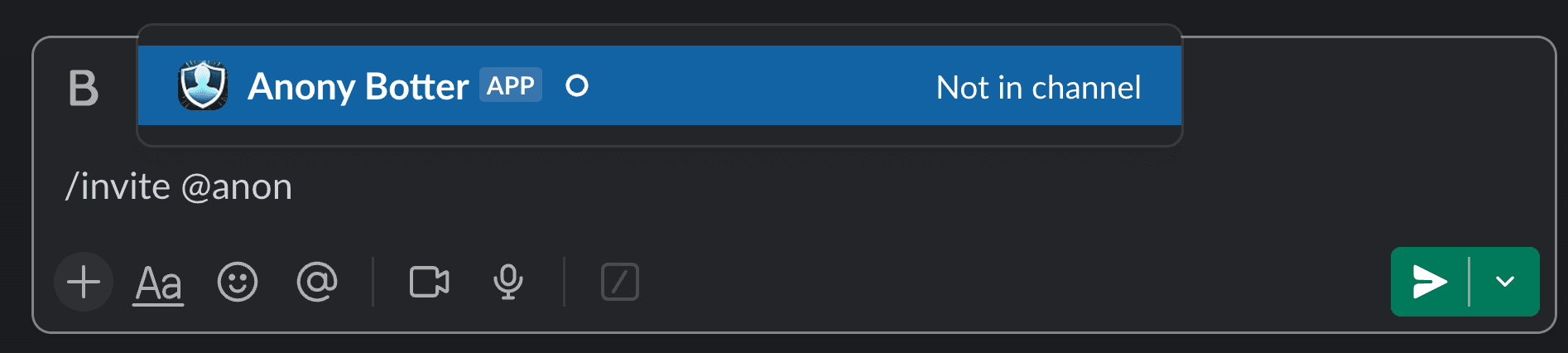
- Invite it to private channels. Type
/invite @Anony Botterin each private channel you want to use. Public channels work right away. - Show your team how to post. The command is
/anony. There are also shortcuts: "Send anonymous message", "Poll Anonymously" and, from a message's ⋯ menu, "Reply anonymously". Our step-by-step guide to sending an anonymous message is easy to share. - Set your rules. In the app's Home tab, admins can turn off anonymous replies, block @here and @channel in anonymous posts, and hide "Also send to channel" on anonymous replies. All three are free. Anonymous replies stay on until an admin turns them off, and the other two stay off until an admin turns them on.
- Decide what to do with Wrenly. Keep it if you use its surveys or recognition. Otherwise, cancel any paid module first, then remove the app from Slack.
Frequently asked questions
Is Wrenly the same app as Incognito for Slack?
Yes. Incognito for Slack was renamed Wrenly. It's the same Slack app, with the same app ID, made by Incognito Apps Inc., and incognitoforslack.com now redirects to wrenlyai.com. On the Slack Marketplace it's listed as "Employee Engagement by Wrenly.ai". The product has also grown from anonymous feedback into a wider HR suite with surveys, recognition and performance reviews.
Is Wrenly free?
Wrenly has a free plan. As of November 2026, its pricing page lists 5 feedback messages a month, 3 engagement surveys a month, 10 peer recognitions a month and 1 admin. Paid modules come with a 2-week free trial. Anony Botter's free plan gives 20 anonymous posts to start, then 3 per day, with polls capped at 1 per day.
Which is cheaper for a 50-person team?
Anony Botter, by a wide margin. Wrenly Engage costs $3 per user per month, so 50 people pay $150 a month and 200 people pay $600. Wrenly shows no annual prices. Anony Botter Plus is $8 a month, or $86.40 a year billed annually, at any team size. Engage does include surveys and a whistleblower portal, which Anony Botter doesn't offer.
Can people post anonymously in public Slack channels?
In Anony Botter, yes, on every plan. Senders pick any public channel and the message posts right away. Private channels work once you invite the app with /invite @Anony Botter. Wrenly sends anonymous feedback to a private leadership channel by default, and public channels come only after admins set them up, according to Wrenly's blog.
Can leaders reply to the anonymous sender?
In Wrenly, yes: leadership replies to anonymous senders are part of its paid plans. Anony Botter works differently. Anyone can answer in the anonymous message's thread, where the channel can read it, and the author can reply back anonymously. On Plus, reply-notification DMs tell the author and earlier anonymous repliers when someone replies anonymously.
Can admins see who sent an anonymous message in Anony Botter?
Only with audit mode, an Enterprise setting that's off by default. When it's on, senders see a notice in the compose window before they post, and it only covers messages sent while it's on. Workspace owners, admins and moderators then see the author through the message's ⋯ menu, under Details. Without audit mode, Slack shows the app as the sender.
Does Anony Botter work in Microsoft Teams?
No. Anony Botter is built for Slack only. Wrenly also works in Microsoft Teams, so if your company runs on Teams, or splits its people between Teams and Slack, Wrenly is the better fit there. If your team lives in Slack, you can install Anony Botter from the Add to Slack button, and the free plan never expires.